How to Spot Email Phishing Attacks—the Most Common Type of Cyberattack in Healthcare
Written by: Ali Khan, Director of Cyber Defense, Veradigm, and Cheryl Reifsnyder, PhD
October is National Cybersecurity Awareness Month, a global initiative to raise awareness of cybercrime and how to protect against it. This awareness is especially crucial in healthcare, a primary target for cybercriminals. Healthcare organizations face more frequent and more sophisticated cyberattacks from criminals seeking to exploit valuable patient information and cripple critical healthcare functions. Learning how to spot phishing emails is one of the most effective ways your team can help stop them.
Healthcare data breaches carry serious financial consequences. Worse, such breaches can have life-and-death consequences. They may delay treatments, disrupt medication pipelines, and put patient lives at risk. According to a recent MGMA Stat poll, only 19% of practice leaders are very confident in their ability to recover quickly from a cyberattack.
The majority of successful cyberattacks and data breaches in healthcare do not arise from sophisticated AI tools infiltrating system security. Most are the direct result of human error—by design. Cybercriminals exploit the urgency and trust found among healthcare workers to gain entry into healthcare systems. Even a single lapse of judgment, such as clicking a link in a phishing email, can expose an entire system to attack.
This post covers the most common types of phishing attacks, the red flags to watch for, and three phishing email examples based on real attacks so you can test your skills.
Email phishing: The most common attack type in healthcare
Phishing is a digital form of social engineering that uses authentic-looking email messages to trick recipients into sharing sensitive information, such as login details or bank account numbers. Phishing attacks are the most common method cybercriminals use to target businesses, especially in healthcare, and their numbers are rising.
Types of phishing attacks
The top 5 types of healthcare phishing attacks include:
- General email phishing: This uses a broadly distributed, generic message, counting on numbers rather than the use of specific information. Messages may be disguised as legitimate updates or alerts, but often include dangerous attachments and/or links designed to trick the user into downloading malware or entering credentials on a fake login page. Despite their generic nature, they caused 63% of 170 reported email-related breaches in 2025.
- Personalized attacks, or “spear phishing”: Spear phishing gets its name from the highly personalized nature of messages. They may include recipient details harvested from public sources, and often reference real colleagues, projects, or events. This specificity makes it difficult to spot.
- Business Email Compromise / Brand Impersonation: Designed to mimic official communications from an existing vendor or government agency, they often include realistic logos and colors. Like “spear phishing,” they may include personal details to make them more convincing.
- QR code phishing: This type of phishing attack uses malicious QR codes in messages. As QR codes bypass traditional text-based security filters, they can be particularly difficult to spot.
- AI-generated phishing: Many phishing attacks now use AI to generate more polished content. As a result, phishing emails can no longer necessarily be identified by poor grammar or misspellings. AI also enables cybercriminals to scale up their attacks; credential phishing increased by 700% in late 2024.
Most common categories seen with Veradigm clients
Our clients report seeing several common themes in phishing attacks:
- Fake bills and payment requests, often including language such as “overdue invoice” or “approve this payment”; they may also include a “secure” document attachment—with the password provided in the subject line.
- Requests for payroll, tax, or billing information from someone claiming to be a boss or auditor.
- Emails from a real client or vendor whose account was hacked; the name and email address look correct because they are correct. Someone else is illicitly using the account.
- Fake notices of voicemail or a shared document, which take you to a fake Microsoft sign-in page.
- Emails claiming to be from the CEO; for example, one company’s CEO was included in the subject line of 31 suspicious emails reported to their Security Operations Center this year.
How to spot phishing emails: Common red flags
Fortunately, you can often spot phishing attempts by watching for a few “red flags”:
- High-pressure tactics and threatening language: Attackers often use high-pressure tactics such as short timelines, urgent (fake) IT alerts, urgent supplier requests, attachments claiming to be medical images requiring immediate review, or time-sensitive requests for sensitive information.
- Generic greeting: Phishing emails may begin with “Dear User” or “Dear Healthcare Professional” rather than being addressed specifically to the recipient.
- Non-official or unrelated email address: Phishing emails are often from email addresses containing unusual domains or domains unrelated to the message’s claims.
- Hovering over links reveals URLs that differ from the visible text: Always hover over links within an email to confirm their destination. Avoid clicking on shortened URLs.
- Unexpected attachments: Phishing attacks often include attachments claiming to be scans, reports, or other urgent information. These claims are designed to lure you into opening them—exposing your system to malware or other cyberattacks.
- Footer missing official contact information: Formatting errors such as failure to include official contact details in a message’s footer may reveal a phishing attack.
- Request for financial or other sensitive information inappropriate to share via email: Phishing attacks may deviate from standard security procedures, for example, by asking for login credentials, payment updates, or patient information via email. Reputable organizations use secure portals to exchange information that needs to remain secure.
Your turn: Real-world phishing email examples
These 3 phishing email examples are sample emails based on actual attacks seen by Veradigm clients. Review each example and see if you can identify the red flags marking it as suspicious.
Links to answers and explanations follow each example.
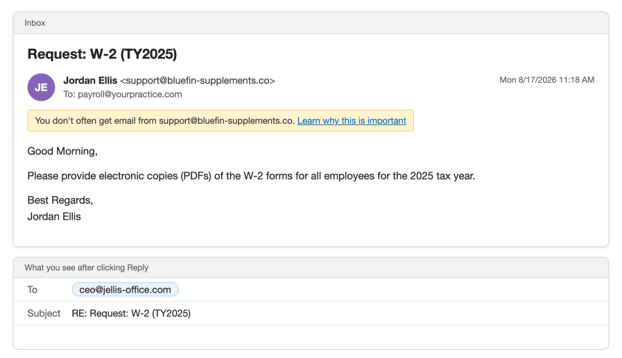
Example 1: The CEO needs everyone’s W-2
Can you spot at least 5 red flags?
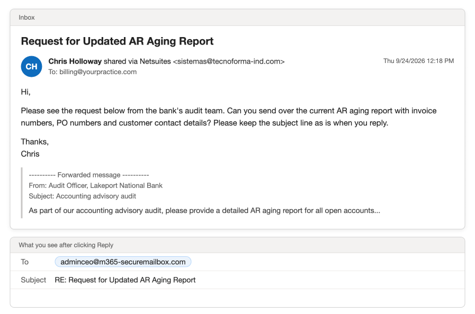
Example 2: The “auditor” who wants your list of unpaid bills
Can you spot at least 5 red flags?
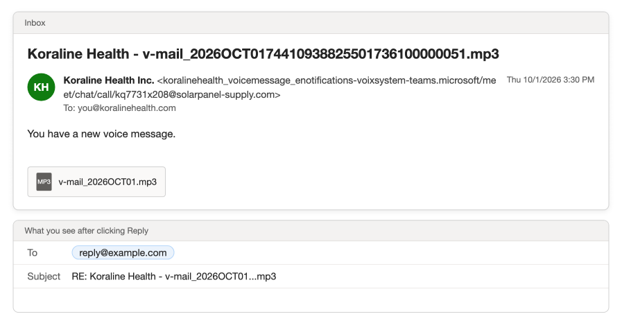
Example 3: The voicemail that isn’t
Can you spot at least 5 red flags?
Answer key: Phishing email examples and red flags
Example 1: The CEO needs everyone’s W-2
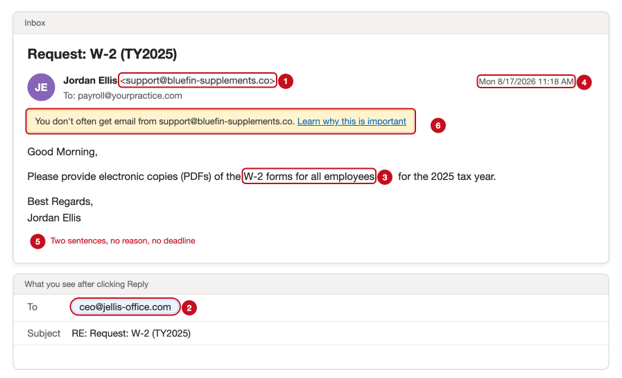
Red flags
- The name says it’s from your CEO, but the email address next to it belongs to a supplement company.
- When you click Reply, the address changes to a completely different one. Real coworkers don’t do that.
- It asks for every employee’s W-2. That’s everyone’s Social Security number, home address, and pay information in one email.
- W-2s go out in January. Asking for all of them in August doesn’t fit.
- The request is two sentences long, with no reason and no deadline. A real request for something this sensitive would include an explanation and usually go through Human Resources.
- The yellow banner at the top says you don’t usually get email from this sender. That’s worth a pause when the name is someone you know.
What to do: Call the person named at a number you already have. Never send tax forms or other sensitive information because an email asked for them.
Example 2: The “auditor” who wants your list of unpaid bills
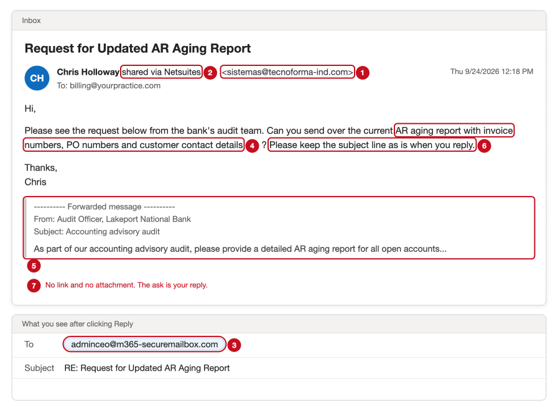
Red flags
- The name belongs to someone you work with, but the email address is from an unknown company.
- “Shared via Netsuites” is stuck onto a person’s name. People don’t sign their emails that way. Also note that “Netsuites” is a misspelling of a real product.
- When you click Reply, the address changes to one that seems like Microsoft but isn’t.
- The email asks for a list of everyone who owes you money, with invoice numbers and contact details. A scammer can use that list to send your customers fake bills.
- A note from a “bank auditor” is pasted in to make the message look official and urgent.
- “Keep the subject line as is” is an odd thing to ask. It helps the scammer keep track of your reply.
- There’s nothing to click. The scam is getting you to reply with the data.
What to do: Check with the coworker in person, by phone, or on Teams before sending anything financial.
Example 3: The voicemail that isn’t
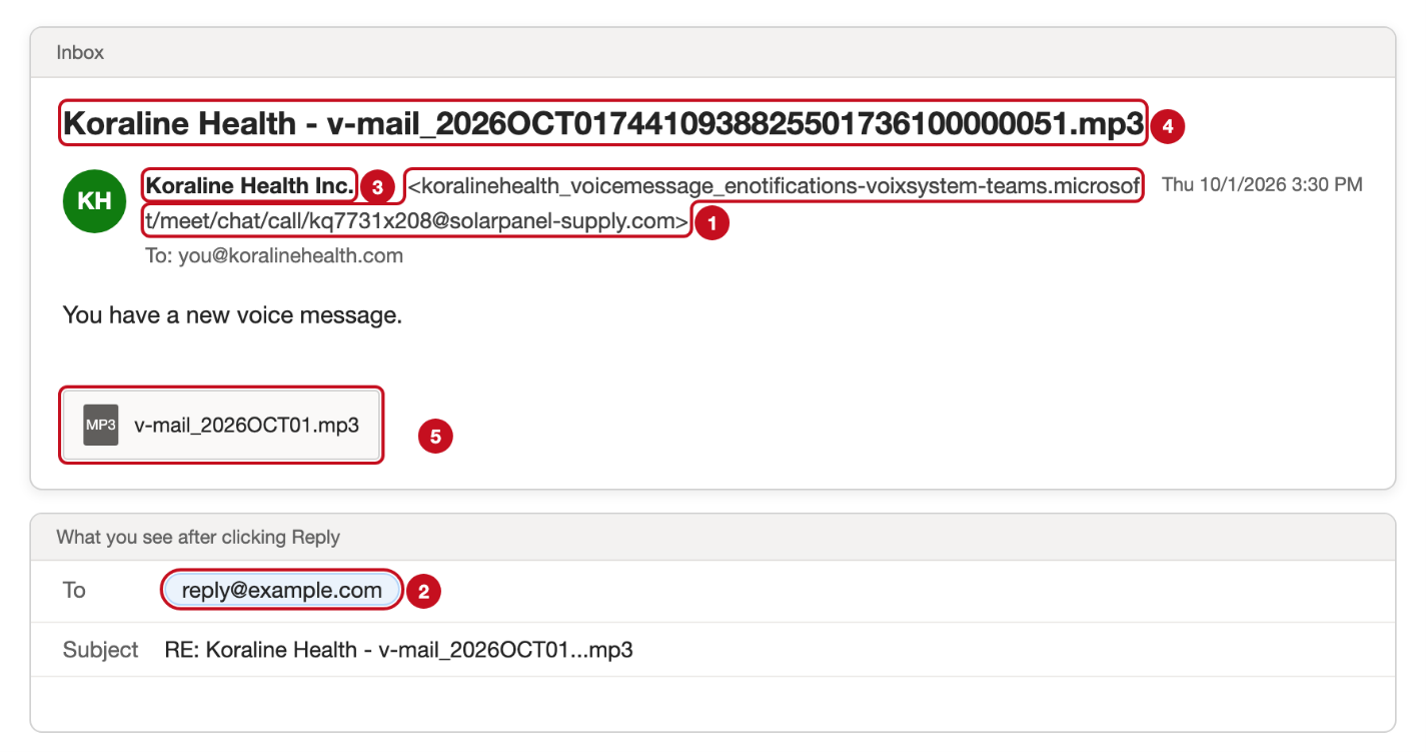
Red flags
- The sender’s address is a long jumble made to look like it came from Microsoft Teams. Look at the end: it’s from a solar panel company.
- When you click Reply, it goes to “reply@example.com.” No real business uses that address.
- It uses your organization’s name, so it feels like it came from inside. It didn’t.
- The subject line is a string of numbers ending in “.mp3.” A real voicemail notice tells you who called and when.
- The “voicemail” isn’t a recording. Open it, and you get a purchase order between two companies you’ve never dealt with.
What to do: Don’t open voicemail attachments you weren’t expecting. Check voicemail in your phone system or Teams directly.
Awareness prevents breaches
Healthcare’s often high-pressure environment makes it particularly vulnerable to the psychological manipulation of phishing emails. According to Verizon, 68% of all data breaches involve a “non-malicious human element,” such as someone clicking on a link in a phishing message.
Remember to look for red flags. If something feels off, don’t click and don’t reply! Use an existing phone number to check with the sender and use the “Report” option to notify your security team of suspicious messages. Staying alert can make the difference between thwarting a cyberattack and enabling a serious data breach with potentially life-threatening consequences.